From your license key to your first audit report
A clean, linear getting-started path for new NSAuditor AI Enterprise customers:
install → activate → configure → scan → read the results.
Eleven steps, plus an optional Pro add-on and the Claude Desktop / MCP workflow.
Everything runs on your machine, and the egress register that ships in the Enterprise package
(utils/egress_register.mjs) enumerates 21 outbound paths, each with its trigger and its default,
so the claim is one you can audit rather than one you have to trust.
Written for the current shipped product, EE 2.0.0, which requires
CE ≥ 1.0.0 — install the trio in Step 2 and you get the matching pair.
New in 0.34.0 and set up between Steps 6 and 7:
exploit intelligence — CISA KEV + FIRST EPSS,
which reorders the finding queue so a known-exploited MEDIUM outranks an unexploited CRITICAL.
RFC 3161 trusted timestamping is opt-in via
NSAUDITOR_TSA_URL — never a default —
and each compliance artifact then carries a .tsr sidecar your auditor verifies offline with stock
openssl, against a Time-Stamp Authority you choose, with none of our software in the path.
New in 0.44.0:
nsauditor-ai report --from <out-dir> --format executive
turns a finished scan into a self-contained, print-ready HTML report that opens with
no external network reference — and it names on the page, counted, any
container of finding-like records it did not read, so silence is disclosed rather than rendered.
Step 9 shows you where it lands.
After buying NSAuditor AI Enterprise from nsauditor.com/ai/enterprise, your confirmation email contains two things you'll need below:
• your Enterprise license key — enterprise_eyJhbGciOiJFUzI1NiIs...
• your npm access token — npm_xxxxxxxxxxxxxxxxxxxxxxxxxxxxxx
(read-only; @nsasoft/nsauditor-ai-ee is a private, restricted npm package).
First, register to receive your license key. AWS bills you, but it doesn't hand us your email —
so after subscribing on the
AWS Marketplace listing,
go to nsauditor.com/ai/marketplace/register
and enter your email, your AWS account ID, and your Agreement ID (agmt-…, shown in
AWS Console → AWS Marketplace → Manage subscriptions). Your ES256-signed license key is then emailed to you.
(The Usage Instructions on the listing carry the same steps.)
Your delivery channel is the Docker container image, not npm — the emailed key comes with the
docker login / docker pull / docker run commands instead of an npm token,
and the image already bundles the full platform (CE + Enterprise package).
Skip steps 0–3 and 5 below — run the container with your key instead:
docker run --rm -e NSAUDITOR_LICENSE_KEY="enterprise_eyJ..." <image> license --status.
Steps 4 (cloud credentials — pass them as -e vars or a mounted --env file),
6–7 (your first scan and --aws-region scoping), and 9 (reading the results) apply identically
inside the container. Billing, renewal, and cancellation for Marketplace orders are managed in your
AWS account (see the EULA's AWS Marketplace Addendum) — your license key still verifies fully offline.
The 11 steps
- Install Node.js 24
- Authenticate with npm
- Install the platform + Enterprise package
- Activate your license
- Configure AI & cloud credentials
- Verify activation
- Run your first Enterprise scan
- Scope the AWS audit to regions
- Use NSAuditor AI with Claude Desktop (MCP)
- Read the results & troubleshoot
- Deliver the report to the client
Enterprise add-on (new in EE 0.38.0): Establish evidence-pack authorship — compliance sign-pack / verify-pack
Isolated networks (new in EE 0.37.0): Install on an air-gapped host — carry the package and the CVE data in
Enterprise add-on (new in EE 0.36.0): Sign and verify suppression approvals
Pro add-on (new in EE 0.34.0): Set up exploit intelligence — CISA KEV + FIRST EPSS
0Install Node.js 24
Node.js 24 is the supported runtime of Enterprise and Community
(engines.node >=24.0.0 in both). Download the installer from the official
Node.js Downloads page, choose a
24.x build, and run the installer that matches your OS (Windows .msi /
macOS .pkg). Upgrading from an earlier release on Node.js 20 or 22? Move to Node.js 24 first: on
Node.js 22 the certificate auditor (plugin 040) cannot grade certificate signatures.
$ node --version   # v24.x — the supported runtime
$ npm --version
1Authenticate with npm
@nsasoft/nsauditor-ai-ee is a private (restricted)
package. Configure the read-token from your license email so npm can download it.
# Global: set the auth token for the npm registry
$ npm config set //registry.npmjs.org/:_authToken npm_xxxxxxxxxxxxxxxxxxxxxxxxxxxxxx

# Or, scoped to your home ~/.npmrc
$ echo "//registry.npmjs.org/:_authToken=npm_xxxxxxxxxxxxxxxxxxxxxxxxxxxxxx" >> ~/.npmrc
2Install the platform + Enterprise package
Install all three packages: the free Community Edition runtime, the agent skill (for Claude Desktop / Claude Code), and the Enterprise package — your 29 Enterprise plugins (28 cloud auditors plus 1023 Zero Trust Assessment, which scores a network-host scan) and eight compliance frameworks.
$ npm install -g nsauditor-ai@latest \
                  nsauditor-ai-agent-skill@latest \
                  @nsasoft/nsauditor-ai-ee@latest
1 · Upgrade Community and Enterprise together.
Enterprise 2.0.0 requires Community 1.0.0 or newer:
npm i -g nsauditor-ai@1.0.0 @nsasoft/nsauditor-ai-ee@2.0.0,
then confirm the pair with npm ls -g | grep nsauditor. Both run on Node.js 24, the supported
runtime — upgrade Node.js first (Step 0). The Community floor is an optional peer
dependency that npm install -g does not enforce: installing Enterprise alone over an older global
Community exits 0 with no peer warning. Below the floor Enterprise’s core does not load while its plugins
still do — license --plugins still lists all 29 and a scan selects them — so the scan
skips the intelligence (CVE), analysis-agent and compliance stages. Since Community 0.2.56 a failed Enterprise load
is named on stderr ([EE] Enterprise is installed but FAILED TO LOAD); an older Community says nothing,
which is why it is worth checking.
2 · Rescan after upgrading before you compare.
On TCP, a port whose authoritative probe did not identify its service is no longer listed as a service, so
compared across the upgrade, a phantom row’s disappearance reads as not measured, never as fixed. A weak
certificate under a trusted CA now reads as the weak-key or weak-signature finding alone, not also as an untrusted
chain; a weak certificate under an untrusted CA still reads untrusted. Coming from a build older than 1.3.0: the
exposure agent’s, the service agent’s and plugin 1160’s rows changed what identifies them in
1.3.0, so a comparison across that upgrade reads those rows identity-basis-changed, never RESOLVED or
NEW; and a scan made by an older build carries no record of a plugin left out of it, so compare scans made with
1.3.0 or later.
3 · Rotate a webhook URL that a logged --watch run printed.
--watch printed the full --webhook-url to stdout; it now prints the host. If you ran
--watch with a Slack or Teams URL where stdout is logged, rotate that URL.
4 · Coming from a build older than 1.3.0? Two exit codes can move a pipeline.
--fail-on gates findings it never read before, so a pipeline that passed may fail on findings that
were always there; and nsauditor-ai mcp verify-call <id> without --response exits 3,
not 0.
5 · Re-check any suppression rule that matches the evidence-gap finding by title. The title of the evidence-gap finding changed in EE 0.32.9. A suppression rule written against the old text stops matching, so those findings resurface rather than stay hidden. That is the safe direction — nothing is silently suppressed — but the change itself is silent: no error, no warning, the rule simply goes inert. Re-point any rule keyed to the old wording.
6 · Re-scan; do not re-process a scan captured before 0.32.9. An archived scan taken on an earlier build was captured before the fail-closed evidence-gap behavior existed, so re-processing it cannot reconstruct what a cloud that failed to start would now disclose. The engine warns when it re-processes such a scan. Run the scan again against the live account instead of re-rendering the old capture.
Why it matters: before 0.32.9, when a cloud plugin could not start — its optional SDK absent, its credentials unusable — it refused to report, and that refusal evaporated one layer up. The compliance report came out byte-identical to one where the scanner ran and found nothing: ten controls read PASS, no violation, no warning. The dangerous shape is ordinary — AWS and GCP scan for real, Azure's SDK is absent, and the combined pack reads as a clean three-cloud audit. Now every in-scope control of a cloud that could not be scanned carries a fail-closed evidence gap. Expect gaps where you previously saw passes; that is the corrected reading.
7 · Coming from a build older than 0.32.10? Expect four more out-of-scope rows in your next SOC 2 report. Since EE 0.32.10 the SOC 2 matrix has been enumerated in full at 10 covered / 4 partial / 37 out of scope = 51. CC7.4, CC7.5, A1.1 and A1.3 had appeared nowhere in the mapping data — silently non-enumerated, which is not the same thing as out-of-scope-with-a-reason. Each now renders with an architectural reason and the operator-side evidence that closes it. No control changed status and no routing changed: covered stays 10, partial stays 4, and every existing control-id membership is identical. The other six matrices are unchanged.
3Activate your license
One command — no shell-rc edits. The CLI verifies the JWT signature before
persisting, and stores the key in the macOS Keychain (or ~/.nsauditor/.env mode
0600 on Linux/Windows).
$ nsauditor-ai license install enterprise_eyJhbGciOiJFUzI1NiIs...
✓ Enterprise license installed
  Stored at: macOS Keychain (service=nsauditor-ai)
  Org: you@example.com   Seats: 5
  Expires: 2027-04-04T...
An environment variable also works and takes highest priority in the multi-source loader:
export NSAUDITOR_LICENSE_KEY=enterprise_eyJ...
If you ever hit a license_id_mismatch on macOS, clear both
~/.nsauditor/license-state.json and the Keychain entry
NSAUDITOR_LICENSE_ID (Keychain wins on read). On Linux/Windows it is file-only.
4Configure AI & cloud credentials
Create a dotenv file with your AI provider key and the cloud credentials for the account(s)
you want to audit. The file stays on your machine: the cloud credentials in it go only to your own cloud
providers’ APIs, the AI key only to the AI provider you chose, and nothing is sent to Nsasoft. Keep
one .env per account (e.g. ~/envs/dev.env,
~/envs/prod.env) and select it per scan with --env (Step 6).
# ── AI provider (used for the optional AI analysis layer) ──
AI_ENABLED=true
AI_PROVIDER=claude                       # openai | claude | ollama
ANTHROPIC_API_KEY=sk-ant-...             # or keychain:ANTHROPIC_API_KEY on macOS — your key, stays local
ANTHROPIC_MODEL=claude-sonnet-4-6

# ── Which cloud(s) this file audits ──
CLOUD_PROVIDER=aws,gcp,azure

# ── AWS ──
AWS_ACCOUNT_ID=
AWS_ACCESS_KEY_ID=
AWS_SECRET_ACCESS_KEY=
AWS_DEFAULT_REGION=us-east-1

# ── Azure ──
AZURE_CLIENT_ID=
AZURE_CLIENT_SECRET=
AZURE_TENANT_ID=
AZURE_SUBSCRIPTION_ID=

# ── GCP (Application Default Credentials) ──
GOOGLE_CLOUD_NUMBER=
GOOGLE_CLOUD_PROJECT_ID=
GOOGLE_APPLICATION_CREDENTIALS=/Users/myuser/.config/gcloud/application_default_credentials.json
GOOGLE_IMPERSONATE_SERVICE_ACCOUNT=your@project-id
What the AI provider receives (since Community 1.0.0): an AWS account ID in an ARN or an AWS URL becomes
[ACCOUNT_ID] everywhere it occurs in the AI payload, and any other 12-digit number
[REDACTED_ID]. The system prompt is written beside the payload
(scan_response_ai_system_prompt.txt) before the request, so the two files are what left the machine.
NSAuditor AI performs read-only auditing — it reads configuration and metadata only and never needs create, write, modify, or delete permissions. Always supply read-only, least-privilege credentials for the account(s) you audit:
- AWS — attach the
ReadOnlyAccessorSecurityAuditmanaged policy - Azure — assign the built-in
Readerrole - GCP — grant
roles/viewer
Read-only scoping means an audit cannot change your environment. Supplying credentials with write or other state-changing permissions is unnecessary and is entirely at your own risk. You are responsible for provisioning, scoping, rotating, and revoking these credentials — see EULA §5.5.
5Verify activation
$ nsauditor-ai license --status
✓ Enterprise license active | Org: you@example.com | Seats: 5 | Expires: 2027-04-04
6Run your first Enterprise scan
The headline use case is a cloud audit: point NSAuditor at a cloud account and get one evidence pack mapped across the compliance frameworks you ask for.
# Scan ALL THREE clouds in one run — comma-separated sentinels (CE 0.2.17+).
# --plugins all auto-scopes each cloud to only its plugins; one out/ subfolder per cloud.
$ nsauditor-ai scan --host aws,gcp,azure --env ~/envs/clouds.env --plugins all --compliance all --out out

# …or one cloud at a time, one dotenv file per account (credentials load for THIS scan only)
$ nsauditor-ai scan --host aws --env ~/envs/dev.env     --plugins all --compliance soc2 --out out/aws-dev
$ nsauditor-ai scan --host aws --env ~/envs/prod.env    --plugins all --compliance soc2 --out out/aws-prod

# Or a named profile from ~/.aws/credentials (no .env needed)
$ nsauditor-ai scan --host aws --aws-profile prod --plugins all --compliance soc2 --out out/aws-prod

# GCP / Azure per-account via --env (key-file path / service-principal vars live in the file)
$ nsauditor-ai scan --host gcp   --env ~/envs/gcp-prod.env   --plugins 1021 --compliance soc2,cis-v8 --out out/gcp-prod
$ nsauditor-ai scan --host azure --env ~/envs/azure-prod.env --plugins 1022 --compliance soc2        --out out/azure-prod

# New in EE 2.0.0: every one-shot compliance scan writes scan_drift_<fw>.json beside its pack.
# Re-run into the same --out; --notify-webhook (public https only) tells Slack, Teams or your webhook when a control goes to fail.
$ nsauditor-ai scan --host aws --env ~/envs/prod.env    --plugins all --compliance soc2 --out out/aws-prod \
    --notify-webhook https://hooks.slack.com/services/… --notify-format slack --notify-severity high
--host aws,gcp,azurescans one or more clouds in a single run (comma-separated;--host awsfor just one). With--plugins alleach cloud auto-scopes to only its plugins (other clouds + non-cloud plugins are skipped and logged). Don't writeaws|gcp|azurewith pipe characters — your shell treats|as a pipe.--compliancetakes a CSV of any of the eight frameworks:soc2,hipaa,nist-csf,pci-dss,iso-27001,cis-v8,gdpr,nist-800-171(gdpremits the GDPR Article 32 Security-of-Processing infrastructure substrate — Art. 32 only, not GDPR compliance).- Optional — push evidence to your GRC platform: set
COMPLIANCE_GRC_PROVIDER=vanta(ordrata/secureframe) +COMPLIANCE_GRC_TOKENand the scan maps its findings to your Vanta, Drata, or Secureframe workspace and pushes them at scan time — opt-in, early-access, nothing sent to Nsasoft, token never serialized; finding text andhost:porttargets go to your workspace unredacted unless you setCOMPLIANCE_GRC_REDACTIONtohashorremove. See the GRC Connectors guide for the full setup. - Know when a control moves between audits (Enterprise, new in EE 2.0.0): every one-shot compliance scan writes
scan_drift_<fw>.jsonbeside its pack — the controls that went to fail or to pass, the controls that lost measurement, and the violations that are new or cleared. A violation is cleared only when this scan looked for it and it was gone; one whose scanner did not run or reported itself down, or whose port or region was not measured, is listed as could-not-measure with its reason. The previous run is the one before it in the same--outdirectory (or, with none there, the newest prior pack for the host in--compliance-history). Add--notify-webhook <url>(publichttpsonly; treat the URL as a secret) with--notify-format generic|slack|teamsand--notify-severityto send the drift when a control goes to fail or loses measurement, when a new violation reaches the severity you set, or when the drift could not be compared with a previous run, which always notifies (a first scan is a baseline and sends nothing; a previous pack that is missing for this host or framework, or unreadable, always notifies). The payload is minimal by default. CLI only — not--watch, not the MCP server. A notification retried after a timeout or a server error can arrive twice, and a hanging endpoint can cost about 32 seconds per framework. A scan that found its ports with the Nmap plugin (024) alone has no port oracle, so a violation on a port that scan did not measure can be listed as cleared; include the port scanner (003) in the scans you compare. On a host where another port completed a TLS handshake, a port whose TLS probe failed in transport is not read, so an earlier TLS finding there can be listed as cleared; and a previous pack that recorded neither a scanned host nor a single scope target (a pack records its host since Enterprise 1.1.0) cannot be re-keyed, so its agent findings are listed as cleared and new once. The Slack setup steps, every notification flag with its default, and the payload a receiver gets: Webhooks. - A missing
--envfile is a hard error (fail-fast, never a silent skip). --out <dir>writes into the directory you name. Since CE 0.2.33 a directory whose name contains a dot (e.g.--out out/ee-0.32.9) is correctly treated as a directory; earlier builds read the dot as a file extension and wrote the artifacts into the parent directory instead.
Pro: set up exploit intelligence — CISA KEV + FIRST EPSS
On the Pro tier and above (every Enterprise license includes it), findings that
carry CVEs are joined by CVE ID against a local CISA KEV catalog and a local
FIRST EPSS scores file, banded KNOWN_EXPLOITED / ELEVATED / BASELINE, and the
finding queue is reordered exploit-first — a KEV-listed MEDIUM outranks an unexploited
CRITICAL, with the reason attached to every promoted finding: the KEV flag, the EPSS score with its percentile,
the matched CVE ids, and the store's own as-of date. It is off until you configure it,
and no feed data ships with the product — both stores are public files you download and refresh yourself.
# 1 · Download the two public feeds (no account needed for either)
$ mkdir -p ~/.nsauditor/feeds
$ curl -fsSL https://www.cisa.gov/sites/default/files/feeds/known_exploited_vulnerabilities.json -o ~/.nsauditor/feeds/kev.json
$ curl -fsSL https://epss.empiricalsecurity.com/epss_scores-current.csv.gz | gunzip > ~/.nsauditor/feeds/epss.csv

# 2 · Point the scanner at them (add both lines to your shell profile to persist)
$ export NSAUDITOR_EXPLOIT_KEV_STORE=~/.nsauditor/feeds/kev.json
$ export NSAUDITOR_EXPLOIT_EPSS_STORE=~/.nsauditor/feeds/epss.csv

# 3 · Scan as usual — findings that carry CVEs now arrive banded and ordered exploit-first
$ nsauditor-ai scan --host 10.0.0.0/24 --plugins all --out out/lan
- The file formats are the feeds' own — no conversion step. The KEV store is the unmodified CISA catalog JSON; the EPSS store is the unmodified FIRST daily CSV, gunzipped after download.
- Freshness windows: KEV 14 days · EPSS 10 days (CISA publishes roughly twice a week, FIRST daily). Refresh on a cron or before a scan day. A stale store fails closed — it withdraws the negative rather than asserting one, so an out-of-date catalog never reports "not exploited"; the scan says which store went stale and when.
- A store that cannot be parsed is treated as absent, and the scan says so — findings report no-store rather than a false negative.
- Setting these outside a shell?
~expands only in a shell. In a--envfile or in Claude Desktop’s MCP env config (step 8), write the absolute path instead — e.g./Users/you/.nsauditor/feeds/kev.json. A path the scanner cannot read is banner-reported as no-store, never as “not exploited”. - This enriches the CVE matches the scanner already found (network-scan findings matched against the offline NVD store); it reorders the queue and does not change what the scanner detects.
- Requires an active Pro or Enterprise license (step 3). With no stores configured, scans behave exactly as before — the ordering falls back to the risk score.
Enterprise: sign and verify suppression approvals — signed approvals
A suppression is you telling the report that a finding is an accepted risk or a false positive. Suppressions without a signature are first-class and always have been. What 0.36.0 adds is that every compliance report cryptographically verifies each suppression signature it renders, for approvers whose registry entry carries key material — so an auditor can check that an approval came from the person it names, instead of taking a string in a file at its word. This is off until you set it up, it is CLI-only (the MCP surface does not reach these commands), and the private key never leaves your machine. Step 9 shows you how to read the verdict this produces.
# 1 · Create an approval keypair. Private half is written 0600 and stays here.
#     It prints an identity-registry member you can paste as-is.
$ nsauditor-ai compliance keygen --key ~/.nsauditor/approver.pem \
    --approver "Ann Approver" --email ann@example.com --role CISO --team Security

# 2 · Paste that member into your identity registry and point the scanner at it.
#     KEEP THE publicKey FIELD — the fingerprint alone identifies an approver, but only
#     the key material lets a report CHECK their signature.
$ export NSAUDITOR_IDENTITY_REGISTRY=~/.nsauditor/identity_registry.json

# 3 · Record an approval. It is signed because NSAUDITOR_SIGNING_KEY names your key.
$ export NSAUDITOR_SIGNING_KEY=~/.nsauditor/approver.pem
$ nsauditor-ai compliance suppress --suppressions ./audit-out/suppressions.json \
    --source auth_agent --title-pattern "SSH password authentication enabled" \
    --status accepted_risk --rationale "WAF compensating control at the perimeter" \
    --approver "Ann Approver" --attestation-level approver
#   → wrote ./audit-out/suppressions.json — supp-ff78d65c-b96 (accepted_risk)
#       signed: ed25519/local at level approver, checked for approvers whose registry entry carries key material

# 4 · Scan. The approval is picked up and its signature checked, for approvers whose registry entry carries key material.
$ nsauditor-ai scan --host aws --compliance soc2 --out ./audit-out

# Review every approval with expiry status, or re-approve before expiry:
$ nsauditor-ai compliance review --history ./audit-out
$ nsauditor-ai compliance renew --suppressions ./audit-out/suppressions.json \
    --id supp-ff78d65c-b96 --rationale "quarterly re-review" --approver "Ann Approver"
- Where the file goes matters, and 0.36.0 is the release that made this work. Put
suppressions.jsonat your--outbase — the directory you pass, not the timestamped<host>_<time>/folder created inside it during the run. SetNSAUDITOR_SUPPRESSIONSto override with an explicit path; an absolute path is honoured verbatim and a relative one resolves against your working directory, never against the folder the scan invents. keygenrefuses to overwrite an existing key. Regenerating over a signing key destroys the ability to verify every signature it ever made, and nothing tells you at the time — your registry still names the old fingerprint, so it surfaces later aspublic_key_mismatchon archived evidence that was correct when written. Pass--forceonly if you mean it, then re-register the new fingerprint.- A malformed signing key fails the command and writes nothing. If you configured a key you asked for a signed approval; being handed an unsigned one plus an error would be weaker evidence than your stated intent.
renewon a signed approval invalidates its signature, and says so. The expiry and the renewal record live inside the signed payload, so the record afterwards readssignature does not match payload— indistinguishable from real tampering. Re-approve with signing to restore it.- A registry entry with only a fingerprint is not an error. Its approvals render
signed — not checked by this report, which records that no check ran and never that one failed. Every field registry starts this way; addingpublicKeyper approver is the migration. awskms:key references are refused in this release — KMS-held signing is built but has not been exercised against a live key, so it is not reachable here. Local keys andkeychain:LABELreferences work.
Enterprise: sign and verify the evidence pack — compliance sign-pack / verify-pack
A pack already carried SHA-256 sidecars, which prove bytes were not altered. Neither says
who produced it. compliance sign-pack signs the chain-of-custody
envelope with an operator-held Ed25519 key at an approval station, so the
scanning fleet stays keyless. CLI-only, and off until you set it up.
Scope, because it decides what the signature is worth to an assessor. A verified signature proves the holder of a key asserted authorship of one framework’s envelope and the four artifacts it enumerates — not the directory, and not the pack. The key is yours, so authorship is relative to your own key custody and is never a vendor attestation. It is not proof the scan ran, and not proof the findings are true.
1 · Generate the key, outside any container
# the operator-held signing key — generated outside any container, never on a scanner host
openssl genpkey -algorithm ed25519 -out nsauditor-signing.pem
chmod 600 nsauditor-signing.pem
openssl pkey -in nsauditor-signing.pem -pubout -out nsauditor-signing.pub

# the registry keys on the SPKI-DER fingerprint — first 24 hex of its SHA-256
echo "sha256:$(openssl pkey -pubin -in nsauditor-signing.pub -outform DER \
  | openssl dgst -sha256 -binary | xxd -p -c 256 | cut -c1-24)"
2 · Register the approver
Copy the shipped template (data/compliance/identity_registry.json) and add the fingerprint, the
public key and a bounded validity window. Rotation is re-registering with a new
window, and that window is what turns signed_after_revocation / signed_outside_validity
into audit evidence.
{
  "schemaVersion": 1,
  "members": [{
    "displayName": "Release Signing Authority",
    "email": "security@example.com",
    "role": "Release Signing Authority",
    "publicKeyId": "sha256:975a2fc435697025c2765ed7",
    "publicKey": "-----BEGIN PUBLIC KEY-----\n…\n-----END PUBLIC KEY-----\n",
    "approverFor": ["soc2"],
    "attestationLevel": "approver",
    "validFrom": "2026-01-01T00:00:00.000Z",
    "validUntil": "2027-12-31T23:59:59.000Z",
    "revokedAt": null
  }]
}
⚠️ Malformed shapes are refused at load, each with exit 2 — “could not
measure” rather than a verdict: a missing schemaVersion, a member without
email, a member without an approverFor array. Key material under any name other than
publicKey ends the same way by a different route: the registry loads, the member counts as having
no key material, and the run reports that nothing was checked — exit 2
again. Exit 2 is never a pass.
3 · Sign the envelope
NSAUDITOR_SIGNING_KEY=./nsauditor-signing.pem \
nsauditor-ai compliance sign-pack \
  --manifest ./out/<scan>/scan_chain_of_custody_soc2.json \
  --approver "Release Signing Authority" \
  --registry ./identity_registry.json
Two files are written beside the pack: scan_pack_signature_soc2.json (the record) and
scan_pack_signature_soc2.payload.json — the exact bytes that were
signed. The payload ships so an auditor never has to reproduce a canonicalisation.
4 · Verify — two arms, and they answer different questions
# through the identity registry — checks WHO, plus revocation and validity AS AT SIGNING TIME
nsauditor-ai compliance verify-pack --manifest ./out/<scan>/scan_chain_of_custody_soc2.json \
  --registry ./identity_registry.json

# with a bare public key — verifies the SIGNATURE only, and says so in its own output
nsauditor-ai compliance verify-pack --manifest ./out/<scan>/scan_chain_of_custody_soc2.json \
  --public-key ./nsauditor-signing.pub
Supplying both is refused with exit 2, deliberately: a silent precedence rule would let the output name an anchor that was never consulted. Exit 0 verified · 1 a violation · 2 the run could not measure — and the third is never a failure.
A clean run prints the scope bound too, on success as well as on failure:
identity:  OK — resolved through the identity registry … revocation and validity checked as at signing time.
signature: VERIFIED — soc2 / <scanId>, identity model not declared
artifacts: 4 of 4 re-hashed and matching
The trailing identity model not declared is expected, not a warning about your setup: the
signature record itself asserts no attestation level, and the verifier will not promote a registry attribute into
a claim the record never made — who signed comes from the identity: line above it.
5 · Why the verifier re-hashes the artifacts
Because a signature alone would authenticate a manifest whose artifact claims nothing had ever checked. Edit one byte of a covered report — without changing its length — and you get:
signature: VERIFIED          ← the signature is genuinely fine
artifacts: ARTIFACT_HASH_MISMATCH — artifact(s) do not match their recorded sha256: scan_compliance_soc2.md
exit 1
A verifier that stopped at the signature would have called that pack clean. Tamper with the manifest instead and
the verdict is MANIFEST_DIGEST_MISMATCH, with both digests printed — and it accuses nobody, because
a manifest legitimately regenerated after signing hashes differently by construction.
6 · What an auditor does, with openssl and nothing of ours
# 1 — read the digest from the PAYLOAD, never from the record (the record is unauthenticated)
jq -r .manifestSha256 scan_pack_signature_soc2.payload.json

# 2 — hash the manifest on disk and compare
shasum -a 256 scan_chain_of_custody_soc2.json

# 3 — verify the signature over the payload bytes
jq -r .value scan_pack_signature_soc2.json | base64 -d > sig.bin
openssl pkeyutl -verify -pubin -inkey nsauditor-signing.pub -rawin \
  -in scan_pack_signature_soc2.payload.json -sigfile sig.bin
# → Signature Verified Successfully
Step 1 reads the payload, not the record, and that ordering is the point: an attacker who substitutes the manifest could also rewrite the digest it is compared against if you read the record.
7Scope the AWS audit to regions — --aws-region
By default an AWS scan covers a single region (AWS_REGION,
else us-east-1). The --aws-region <one|csv|all> flag controls
which regions the regional auditors cover — and each now audits
every in-scope region, with genuine per-region fan-out (security
groups, EC2, RDS, KMS, Lambda, Secrets Manager, DynamoDB, CodePipeline/CodeBuild, Backup, SQS/SNS,
VPC endpoints, ElastiCache, SES, Inspector/GuardDuty, and CloudTrail).
# A single region
$ nsauditor-ai scan --host aws --plugins all --compliance soc2 --aws-region us-east-1

# A comma-separated list of regions
$ nsauditor-ai scan --host aws --plugins all --compliance soc2 \
    --aws-region us-east-1,eu-west-1,ap-southeast-2

# Every region enabled on the account (DescribeRegions; static-list fallback on AccessDenied)
$ nsauditor-ai scan --host aws --plugins all --compliance soc2 --aws-region all
What a scoped run looks like, end to end:
$ nsauditor-ai scan --host aws --plugins all --compliance soc2 \
    --aws-region us-east-1,eu-west-1,ap-southeast-2 --out out/aws-prod

[region] scope = flag-list · 3 regions requested → resolving…
[region] scanning us-east-1, eu-west-1, ap-southeast-2  (regional plugins fan out per-region)
[plugin] AWS EC2 SG Perimeter Auditor (1170) ......... 3 regions · 5 findings
[plugin] AWS RDS Auditor (1140) ...................... 3 regions · 2 findings
[plugin] AWS IAM Deep Auditor (1030) ................. global · audited once
[plugin] AWS S3 Security Auditor (1020) .............. per-bucket region resolved · 6 findings
✓ scanScope: regionsScanned=[us-east-1, eu-west-1, ap-southeast-2]  regionsWithError=[]
-
›
Precedence
--aws-regionflag ›AWS_REGION(shell /--envfile) › single-region default. -
›
No flag and no
AWS_REGION
One region is scanned and the report adds an informational "incomplete region coverage" advisory listing the enabled regions that were not scanned. It maps to no compliance control — a disclosure, not a finding, so your posture is unchanged. Pass--aws-region allfor full coverage. -
›
Unknown region → fail fast
The explicit flag fails fast on an unrecognized region code (setNSA_AWS_REGION_ALLOW_UNKNOWN=1to permit a brand-new region); anAWS_REGION-derived value warns and proceeds. -
›
Global services audited once
IAM and account-level S3 enumeration run once regardless of--aws-region. The S3 auditors resolve each bucket's own region and skip + disclose buckets outside the scoped set — closing latent cross-region false-cleans.
> Incomplete region coverage — 16 enabled region(s) not scanned (eu-west-1, ap-south-1, …). Re-run with --aws-region all (or set AWS_REGION) for full coverage.
8Use NSAuditor AI with Claude Desktop (MCP)
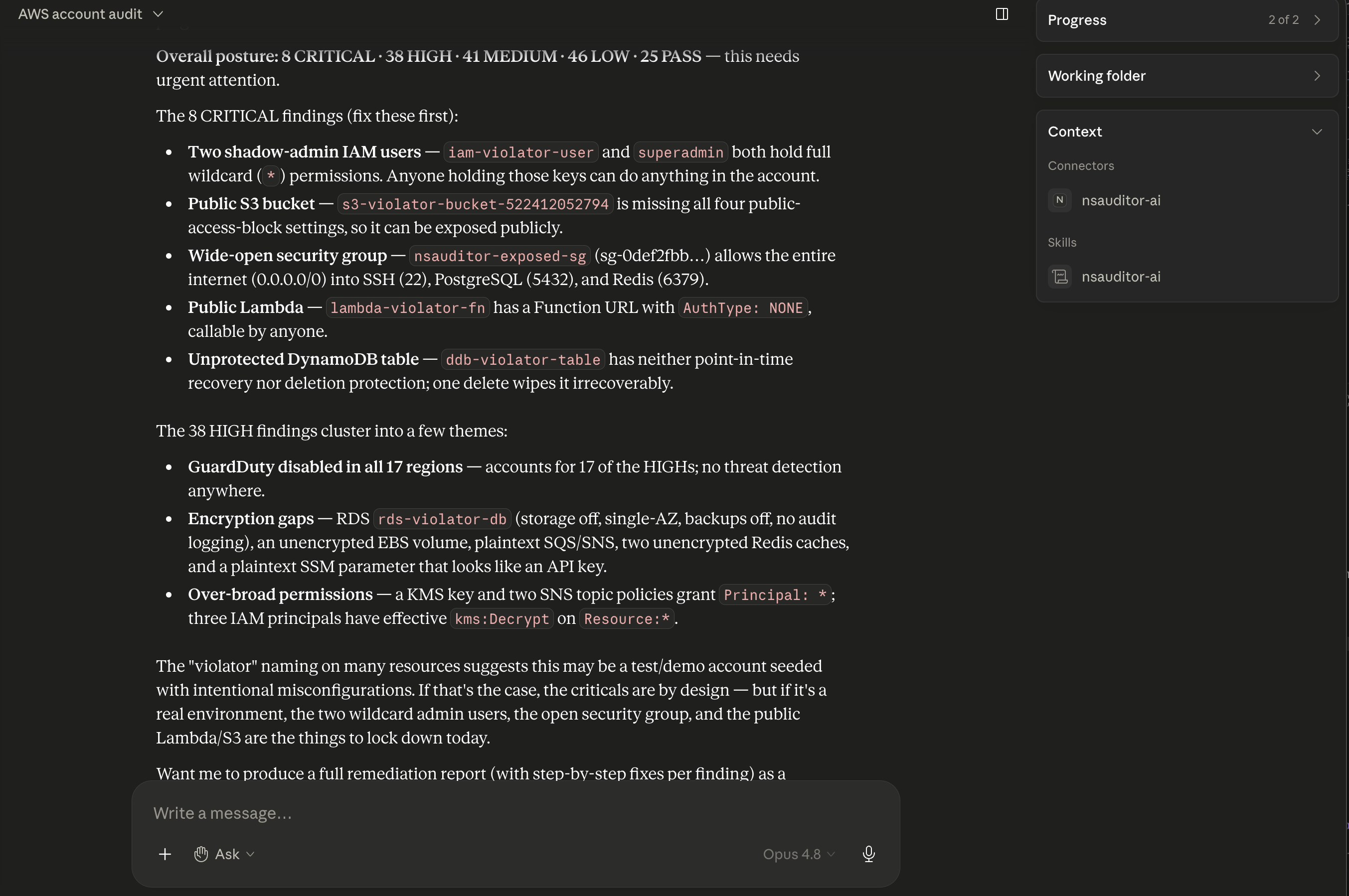
Run audits conversationally from Claude Desktop — "Audit my AWS account" — via the MCP server bundled with the package.
1 · Add the skill
Build the upload archive from the nsauditor-ai-agent-skill package:
npx nsauditor-ai-agent-skill build-zip --out ~/Desktop. In Claude Desktop go to
Customize → Skills, click +,
choose Create skill → Upload a skill, and upload the zip it built
— never SKILL.md alone, which leaves its reference files behind. Fully quit
Desktop (⌘Q) and relaunch after replacing a skill. Skills do not sync between Claude
surfaces: for Claude Code, run npx nsauditor-ai-agent-skill install
(the skill on GitHub).
2 · Register the server, then configure its environment
Run nsauditor-ai mcp install-key first — the server will not start without it — and paste the
mcpServers block it prints into claude_desktop_config.json (Settings → Developer → Edit Config).
That block names node and the server script by absolute path, because Claude Desktop may not see the directory your
shell finds nsauditor-ai-mcp in. Use the installed bin or that block, never through npx: the server is a
bin inside the nsauditor-ai package, and when npx does not find that bin it looks the name up on the npm registry
instead, which never starts this server. For Claude Code:
claude mcp add nsauditor-ai --env NSA_MCP_AUTH_KEY=<from: nsauditor-ai mcp install-key> -- nsauditor-ai-mcp.
Then add variables to that block’s env — a macOS example, using Keychain references:
NSA_ENV_FILE=~/envs/dev.env
MCP_TIMEOUT=180000
AI_PROVIDER=claude
ANTHROPIC_API_KEY=keychain:ANTHROPIC_API_KEY
NSA_ALLOW_ALL_HOSTS=1
PLUGIN_TIMEOUT_MS=90000
CLOUD_PLUGIN_TIMEOUT_MS=45000
NSA_MCP_AUTH_KEY=keychain:NSA_MCP_AUTH_KEY
NSAUDITOR_LICENSE_KEY=keychain:NSAUDITOR_LICENSE_KEY
NSA_ALLOW_ALL_HOSTS=1 is what lets the MCP server scan private addresses (RFC 1918,
100.64/10, fc00::/7). Since Community 0.2.57, private ranges are all it admits over MCP: the server checks every address a host name resolves to,
whether or not the flag is set, and refuses loopback, link-local and cloud-metadata addresses in any spelling.
(On the CLI the same flag still lifts the whole scan-entry guard.) Since Community 1.0.0 the scan then connects
only to the addresses that check resolved — for the target and each redirect hop — so a name whose
answer changes between the check and the scan (DNS rebinding) cannot redirect it. The pin does not hold through an
HTTP proxy set with NODE_USE_ENV_PROXY, which resolves the name itself, or over an idle connection
opened earlier to the same name, for as long as the target keeps it open. An opted-in zone-transfer check
(DNS_AUDIT_AXFR_CHECK, off by default) connects to each nameserver’s own address, which the
host check did not resolve. One case is still not caught: a NAT64
64:ff9b::/96 address that embeds a blocked IPv4 address. Leave it unset unless you need private-range
scans.
CLOUD_PLUGIN_TIMEOUT_MS bounds each plugin, not the whole tool call: raising it can give a slow
plugin more time and lengthens the call. A call that times out in the client returned no result —
never read it as a clean account. The server does not split an all-region call into batches, so for unbounded
multi-region scans use the CLI (nsauditor-ai scan … --aws-region all), which has no MCP client in
the path.
3 · Ask Claude to audit
Say "Audit my AWS account" (one cloud) or "Audit my AWS and Azure accounts"
(several). For region scoping, the MCP scan_cloud tool takes the same scope as a
regions argument:
- Omit
regions→ the region-scoped auditors scan the server-configuredAWS_REGION; the three that enumerate their own region list (CloudTrail trail discovery 1040, GuardDuty/Inspector 1200, EC2 instances 1210) attempt every enabled region. This is the default for a plain "audit my AWS account". - Name regions → pass exactly those (e.g.
["us-east-1","eu-west-1"]). - "All regions / every region / full coverage" → the agent skill discovers then batches: a default scan first (its GuardDuty/Inspector findings list the enabled regions), then the remaining regions 3–5 at a time across successive calls, and it reports the number of regions it actually covered. The server itself does not batch — one
["all"]call can outlast the client’s tool-call timeout and return nothing, which is never a clean account.
8bInstall on an air-gapped host
Everything above assumes the host can reach a registry. If yours cannot, the install and the
vulnerability data both have to be carried in. One condition travels with this path:
the bundle is a restricted distribution rather than a public npm install.
It is not architecture-restricted. Both arches are exercised for this release
rather than inherited from an earlier one: native aarch64, and linux/amd64 in a
container run with --network none — no interface, and DNS does not resolve. (The published
container image is amd64 only — a different delivery vehicle from this bundle.)
1 · On a connected host — get the bundle
The air-gap bundle is a separate, restricted package carrying dependency-complete tarballs for both editions, an install script and SHA-256 checksums. Authenticate with the download token from your purchase email, then fetch it:
npm pack @nsasoft/nsauditor-ai-ee-airgap@2.0.0
tar xzf nsasoft-nsauditor-ai-ee-airgap-2.0.0.tgz
2 · Carry it across, then install offline
Copy the extracted directory to the isolated host and run its script. It verifies the carried checksums before installing anything, installs Community Edition first (Enterprise declares a peer dependency on it), and forces every install offline:
./install.sh
nsauditor-ai license --plugins
A host with no sha256sum or shasum is refused rather than installed onto —
unverified bytes are not installed silently.
What is checked before this bundle ships. Each release re-builds the bundle and runs a
delivery gate against those exact tarballs: it asserts that every declared production
dependency resolves from the carried closure (44 of 44 for the air-gap carrier, which vendors EE 2.0.0), that the plugin census
loads (29 Enterprise plugins), that a store-backed scan returns findings from carried CVE data,
and that the run makes zero network attempts. The gate never reads npm’s exit
status, because that is measured non-evidence here: every production dependency is an
optionalDependency, and a NIC-down install of the unvendored package exits
0 while installing almost nothing. Verify the delivery, not the installer.
2b · Verify the delivery yourself — not the installer
The installer’s exit code is the one thing you should not trust here, and the reason is
structural rather than a bug: every production dependency is an optionalDependency, and npm
skips an unfetchable optional silently. On an isolated host, an install that fetched
nothing still exits 0 and still prints a cheerful summary line. Two commands tell you what
actually landed:
# 1. every declared production dependency resolves from the carried closure
node -e "const p=require('@nsasoft/nsauditor-ai-ee/package.json');
const d=Object.keys(p.dependencies||{}).concat(Object.keys(p.optionalDependencies||{}));
let ok=0; for (const m of d) { try { require.resolve(m); ok++; } catch {} }
console.log(ok + '/' + d.length + ' resolved');"

# 2. the plugin census loads, and the Enterprise tier is active
nsauditor-ai license --plugins
For the currently published air-gap carrier, which vendors EE 2.0.0, the first command must print 44/44, and the second must report the Enterprise
plugins active (29 Enterprise, 56 in total). A partial number is a failed delivery that npm
reported as a success. As a deliberate control, the same procedure run against the ordinary
(non-bundled) package on an isolated host resolves 0 of 44 — while npm still exits
0.
3 · Carry the vulnerability data
No CVE, KEV or EPSS data ships with the product. On a connected host, download the NVD feeds you want and bundle them; optionally carry your own CISA KEV catalogue and FIRST EPSS scores in the same archive:
nsauditor-ai feed bundle --from ./nvd-downloads --out feeds.json.gz \
  --kev ./known_exploited_vulnerabilities.json \
  --epss ./epss_scores.csv.gz
Carry feeds.json.gz across and import it on the isolated host:
# imports the feeds you downloaded, from a bundle you carried — restricted distribution
nsauditor-ai feed import --file feeds.json.gz --extras-dir ./stores
Import prints the environment variables to set for any carried KEV/EPSS files, and names why it skipped records. About a quarter of a real NVD year file is skipped by design — withdrawn CVEs and entries with no CPE match data. That is not data loss. Malformed records are a different signal and mean re-download.
4 · Scan offline
export NSAUDITOR_OFFLINE_ONLY=1
export NSAUDITOR_EXPLOIT_KEV_STORE=./stores/known_exploited_vulnerabilities.json
export NSAUDITOR_EXPLOIT_EPSS_STORE=./stores/epss_scores.csv.gz
nsauditor-ai scan --host aws --env ./org.env --compliance soc2 --out ./out
NSAUDITOR_OFFLINE_ONLY=1 refuses to start if an outbound path is also configured, which
rules out the opt-in RFC 3161 timestamping path in the enclave — that setting makes an outbound call to the
authority you name, and has no default.
A store that cannot answer emits a [COVERAGE GAP] record rather than reading as no CVEs, and since
Enterprise 1.3.0 that record fails, as an evidence gap, the compliance controls a CVE row maps to (HIPAA has no
CVE-mapper rule). A service with no CPE mapping or no detected version is still recorded but routed to no control
— read the coverage gaps beside the verdict.
⚠️ A carried bundle is integrity-checked, not authenticated. The recorded SHA-256 detects a file altered in transit, but it travels inside the archive it covers, so it cannot establish who built it. Treat a bundle as you would any media crossing into an enclave: obtain it over a channel you trust, and check it against the checksums you were given separately.
The bundle's dependency closure is as of its build date; each release rebuilds and re-audits it, and
enclaves update by carrying the new bundle. One optional dependency (mdns) is a native
module that cannot compile without network access — it is not required, and mDNS discovery falls back
to a pure-JavaScript implementation.
9Read the results & troubleshoot
-
✓
Evidence artifacts
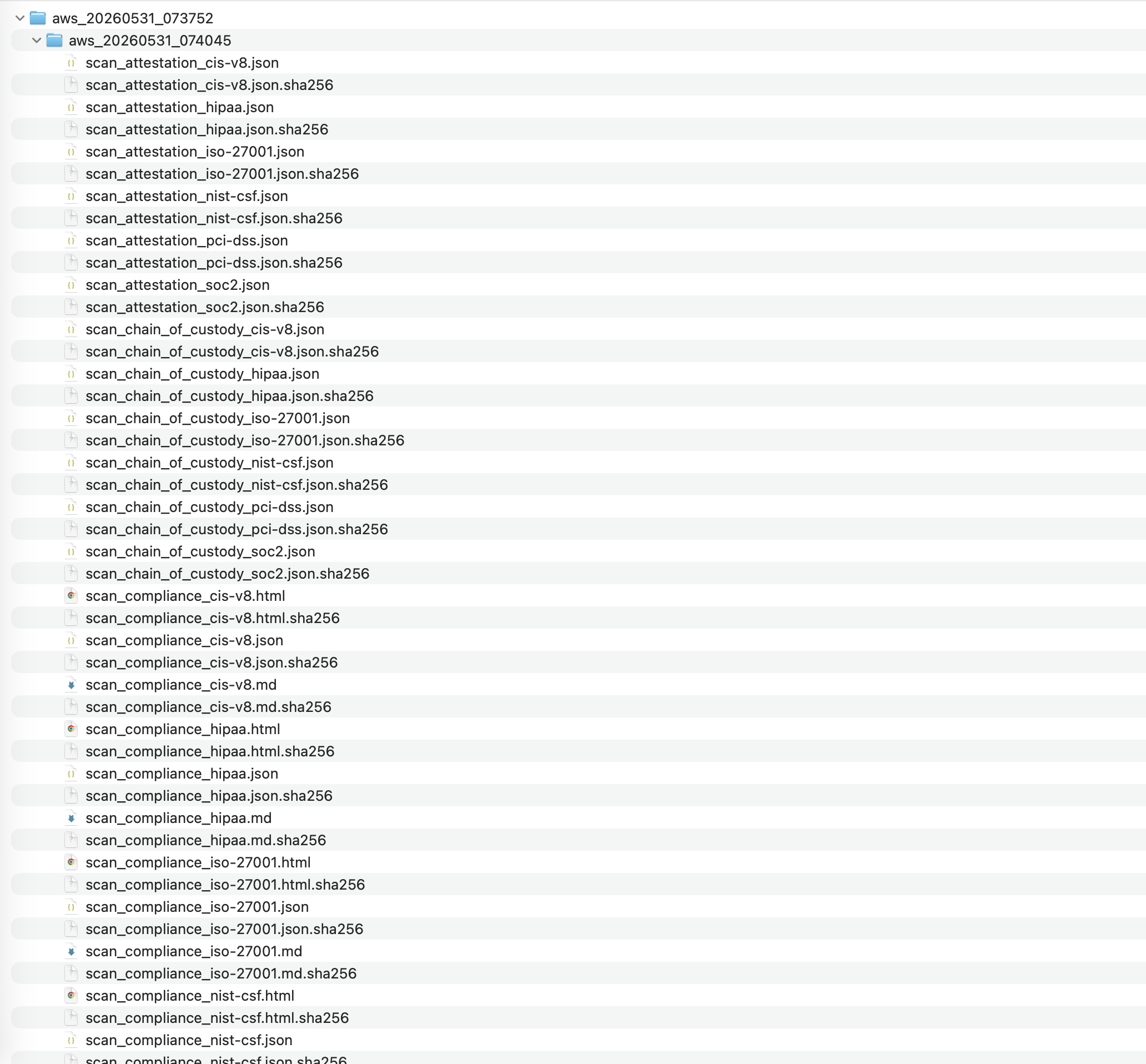
Land under your--outdirectory, one timestamped folder per scan (e.g.aws_20260524_091331/), with the per-framework reports plus SHA-256 chain-of-custody sidecars — and, since EE 2.0.0, ascan_drift_<fw>.jsonbeside each compliance pack: what changed since the previous scan (Step 6). -
✓
Severities
Findings carryCRITICAL / HIGH / MEDIUM / LOW / INFO; the summary rolls them up per provider. -
✓
"0 findings" is NOT automatically a clean pass
If a cloud could not be audited (no creds, plugin errored, region truncated), the report says so explicitly — it never reports a silent clean. As of EE 0.32.9 this holds even when the plugin never started at all: if a cloud's optional SDK is absent or its credentials are unusable, every in-scope control of that cloud carries a fail-closed evidence gap instead of reading PASS. Always confirm the scan actually audited the account. -
✓
Suppression verdicts
Where an approver’s registry entry carries their public key, the report checks each suppression signature it renders against the key material that entry records, and the verdict names the exact signature bytes it verified. Two things are reported separately: whether the suppression should stand, and whether those bytes came from that key — they diverge on a revoked key, which is what turns signing after revocation into a cryptographic finding. A tampered record renders signature FAILED verification. Where the entry is fingerprint-only — as every registry in the field today is — the report reads signed — not checked by this report, and a missing verdict means NOT CHECKED, never FAILED. -
✓
Region coverage
Check thescanScopeblock (and the incomplete-coverage advisory) to confirm which regions were actually scanned. Don't infer "all regions" from GuardDuty/Inspector findings — those enumerate regions internally regardless of scope. -
✓
Turn the run into something you can send
Pro and Enterprise:nsauditor-ai report --from <out-dir> --format executive(the scan’s--outdirectory) renders a finished scan into a self-contained, print-ready HTML report — it opens with no external network reference, so it survives being emailed, archived or opened on a machine with no internet. Add--brandto put your own name on the cover page.--format jirawrites a Jira-importer CSV instead; the column-to-field mapping is done in Jira's own importer and is not verified against a live Jira instance. -
✓
Show what changed since the last scan
Pro and Enterprise: scan again after the fixes, then runnsauditor-ai report --from <out-dir> --format executive --since prior. The same client report gains what is new, what is resolved and what changed severity. When the report can see that a finding was not measured the same way twice, it files it under NOT-COMPARABLE, with the reason on the row, instead of calling it resolved — among the reasons: a host that was not scanned; a finding that carries no producer identity; a plugin that did not run, errored or timed out; an analysis agent that did not run, or whose input plugin was left out of the scan or did not complete; an Enterprise package that failed to load; an evidence gap, including a CVE lookup that failed; a narrower scope; a port whose check could not complete; a TCP port the port scanner saw open that stopped answering between the two scans, or that answered without its service being identified (for a CVE or end-of-life row); a UDP port the other scan did not record as closed or answering; a producer whose identity basis changed across an upgrade; and a CVE the vulnerability data stopped attributing while the same program and version still answer. A finding that could not be compared is not a finding that was fixed. Three measured limits remain: a scan records a plugin left out of it only since Enterprise 1.3.0, so in a comparison with an older scan, an agent’s row that scan lacks is not refused — the report’s Basis cell says so on the row; and a scan that discovered ports with the Nmap plugin (024) alone records no port oracle, so an analysis agent’s or the CVE mapper’s row on a port it did not measure can read RESOLVED and count as closed in MTTR, and the control it failed can read PASS — include the port scanner (003) in scans you compare. The third: on a host where another port completed a TLS handshake, a port whose TLS probe failed in transport is not read, so an earlier TLS finding there can read RESOLVED in the delta report and closed in MTTR. Among the pairs it refuses to compare outright: two runs at different licence tiers, and two runs straddling a release where a reported number changed meaning. Integrity sealing covers scans run since 1.1.0, and framework-enumeration movement is not evaluated in this release; the report says both. How it decides → -
✓
Branding it: what goes inside
brand.json
Add--brand brand.jsonand the cover page carries your name. Every field is optional — omit the file and the report renders unbranded under its default title.// brand.json — keep it next to your logo { "title": "Q3 External Perimeter Review", "companyName": "Acme Manufacturing GmbH", "preparedBy": "J. Rivera, Security Consulting LLC", "contact": "security@example.com", "logoPath": "acme-logo.png" }
titlereplaces the headline ·companyNameis who the report is for ·preparedByis who prepared it ·contactis free text ·logoPathis a local PNG or JPEG, resolved next to the brand file and embedded as a data URI.
The logo rule is strict on purpose — every part of it protects the same promise, that the file opens with no external network reference. A URL is refused and never fetched: a remote logo is egress at render time and a tracking pixel every time your client opens the report. SVG is refused, because SVG is markup that can carry a script and break the no-script guarantee from inside the image. The path may not escape the brand file’s own directory, checked as typed and again after symlinks resolve. The cap is 2 MB, and the format is read from the file’s magic bytes rather than its extension, so renaming an SVG to.pngdoes not get it past the check. A brand file that cannot be read, is not valid JSON, or whose logo is refused is a fatal error and no report is written — a flag you passed is never silently dropped.
--brandapplies to--format executiveonly; passing it with--format jirais refused, not ignored, because a CSV has nowhere to put a cover page. -
✓
The report states what it could not read
Every report carries a container census: where finding-like records sit in a place the report does not read, the report says so on the page, named and counted, rather than rendering a shorter document that looks complete. Read that block before you read the totals — silence is disclosed here, never rendered away. -
✓
Fewer audit-trail false findings on AWS
S3 server access logging being switched off is no longer reported as an audit-trail gap when a CloudTrail data-event trail already covers that bucket. Coverage is judged per selector, and an organization trail or a prefix-scoped selector is refused rather than assumed — so the gaps that remain in your report are the ones with no trail at all.
10Deliver the report to the client
A scan ends with a directory of artifacts. An engagement ends with something the client reads.
Here is the whole path for one consulting firm auditing a client gateway at
192.168.1.1 — the same six moves on a /24, on a cloud account, or on a
hundred hosts. report is a Pro capability and is
included in Enterprise.
$ nsauditor-ai license --status

# On Community, `report` refuses at exit 2 and writes no file:
#   "`report` is a Pro capability. Your licence resolves to tier
#    "community". No file has been written."

# The other precondition is not a command — signed authorization for the
# target range. The scope on that letter is what the report cover should match.
# The logo lives INSIDE the brand directory, named by a plain relative path.
# Containment is checked as typed, and again after symlinks resolve.
~/consulting/brand/
├── brand.json
└── acme-logo.png
$ nsauditor-ai scan --host 192.168.1.1 --plugins all \
      --compliance all --out ~/engagements/acme-2026-09/

# Writes a run record scan_run_<id>.json at the root and a timestamped
# evidence folder beside it, with a .sha256 sidecar per artifact.

# Use ONE --out per engagement. `report` picks the NEWEST run in a directory
# and only refuses on an exact start-time tie — so a directory holding two
# engagements can render the wrong one silently. Name the run when in doubt.
# --run names YOUR OWN run — the id your scan printed. It is the <id> in the
# scan_run_<id>.json at the --out root. The one below is an example.
$ nsauditor-ai report --from ~/engagements/acme-2026-09/ \
      --run 20260904T184352Z-d9d796 \
      --format executive \
      --brand ~/consulting/brand/brand.json \
      --out ~/engagements/acme-2026-09/Acme_192.168.1.1_executive.html

[report] runId 20260904T184352Z-d9d796 · started 2026-09-04T18:43:52.970Z
[report] wrote ~/engagements/acme-2026-09/Acme_192.168.1.1_executive.html
✓ exit 0

# Without --out it writes report_<runId>.html beside the run record — inside
# your evidence tree, named after an id no client recognises. Name it for them.
$ nsauditor-ai report --from ~/engagements/acme-2026-09/ \
      --run 20260904T184352Z-d9d796 \
      --format jira \
      --out ~/engagements/acme-2026-09/Acme_192.168.1.1_findings.csv

# Summary,Description,Priority,Labels,External ID — one row per finding.
# Passing controls are filtered out; nobody wants a ticket for a PASS.
# External ID is stable, so a re-test maps back to the same rows.
# ⚠ The column-to-field mapping is done inside Jira's own CSV importer.
#   That is NOT a live-instance integration we have verified.
# --brand is refused here, not ignored: a CSV has nowhere to put a cover page.
# (a) The container census runs on load. If finding-like records sit somewhere
#     the report does not read, you are told — by container, with a count:
[report] WARNING: N finding-like object(s) on host <h> live in `<container>`,
         which this report does not read. They are NOT in the output.

# (b) Coverage caveats print too, and either can hold without the other:
[report] coverage: partial — N of M not scanned
[report] coverage: incomplete — the run did not record completion

# (c) Then open it. A self-contained file with no external reference looks the
#     same offline as online — the first thing a client's security team checks.
Send the HTML on its own. It is one file — no asset folder, no
stylesheet to lose — and it prints from the browser when the client asked for a PDF. Do not ship
the evidence directory unless the client contracted for raw artifacts; it holds the full conclusion
record and finding queue. What you keep is that directory and its .sha256 sidecars:
they are what let you show, months later, that the report you sent was derived from that scan.
Re-rendering the same --run overwrites the same filename rather than accumulating copies,
so there is never a question of which one is current.