Packet editor is a tool which allows to edit a
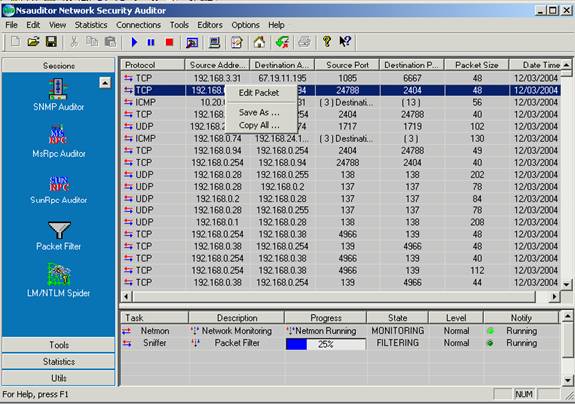
filtered packet header. To filter a packet select Packet Filter in Sessions
tab. After setting appropriate settings of a packet to filter you can start
filtering process by clicking on the button Start. The packets with the
specified parameters will appear in the screen. Right clicking on the row brings
up a pop-up menu with the following commands:
Edit Packet – opens Packet Editor dialog.
Save As – saves the data to the text file.
Copy All - copies all rows.
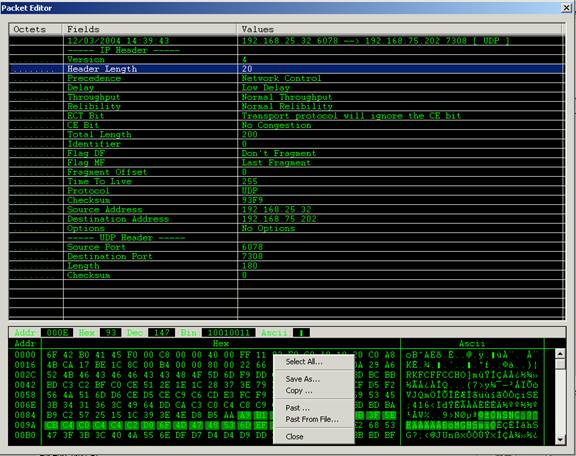
Packet editor is an editor that
allows you to view the decoded packet and edit the packet header and data.
Right clicking on the bottom of
the window brings up the pop up menu with the following commands:
Select All - selects all packet data.
Save As – saves the data to the selected file.
Copy – copies the selected part to the clipboard.
Past - pasts from the clipboard.
Past From File - pasts data from the selected file.
Close - closes the dialog.
Packet editor is a very useful tool in packet analyzing. It
has a user-friendly interface and is designed for easy use.
SpotAuditor
reveals passwords saved in Internet Explorer, recovers
ICQ, Trillian, Miranda IM, VNC, Far ftp client, SecureFX ftp client,
FileZilla, WebDrive
Ftp, FTP
Voyager, AutoFTP,
32bit FTP, FTP Navigator, Dial-up, RAS, VPN, Outlook and MSN messenger passwords, IE Auto Complete
Fields and
recovers passwords stored behind the asterisks in password
text-boxes. It is a program for viewing and cleaning the secret
data stored by Internet Explorer.
SpotAuditor allows
deletion of unwanted entries from the system protected
storage and explores Outlook Accounts, Visited
URLs, Installed Programs and Start Run Programs on a local
machine or remote computers.
SpotAuditor allows to clear Internet Explorer
history, delete cookies and temporary internet files. You
can recover and
restore any lost or forgotten password ever
entered in Internet Explorer.
It allows network administrators to
monitor network shares
and identify shares which are violating
data access policy in their
organization.
NetShareWatcher is very handy. You can configure it
once and forget about
network sharing problems. You need just select
restricted groups or users and every time when
NetShareWatcher will
find network share with access list containing that restricted
groups and will perform an configured action. It allows you to
easily
monitor network shared folders and permissions.
NetShareWatcher alerts anytime an user sets a share ACL to
"Everyone" or some other global group that violates your
data access
policy as well as disable this shared folders automatically if you
have selected appropriate feature in the settings. NetShareWatcher
has user friendly interface and is easy to use. Being configured
once, it will regularly notify you on
network sharing detection with
restricted permissions assigned.
BlueAuditor is a
wireless personal area network auditor and
easy-to-use program for
detecting and monitoring Bluetooth devices
in a wireless network. It can discover and track any Bluetooth
device within a distance between 1 and 100 meters and display key
information about each device being detected as well as the services
device provided. With the growing popularity of the
Bluetooth
technology,
BlueAuditor will enable network administrators to
effectively audit their
wireless networks security
vulnerabilities associated with the use of Bluetooth devices.
BlueAuditor enables the user to save the data of the detected
Bluetooth devices in an .xml file and supports the most Microsoft
Bluetooth drivers available on the market. All the mentioned
features are provided with a user friendly graphical interface.
RemShutdown allows
shutdown or restart network computers
remotely. You can specify a delay during which a message you
specify can be displayed and applications running on the
remote computer at the time of shutdown can be allowed to
close. In addition, RemShutdown offers the user the option
to cancel the shutdown. The tool is designed with a
user-friendly interface and is easy to use.
Product Key Explorer displays product key for
Windows, MS Office, SQL Server and over 40 other
software products installed on your local or remote network computers. In order to install or reinstall Microsoft Office, Windows, or other commercial software, you must have access to a product key (CD Key) for that product. Product Key Explorer retrieves product keys from network computers and allows to protect your
company from
having pirated software on
your network.
With this software you will be able to track the number of
software licenses installed in your business, find
and recover a lost or forgotten product keys, save and
keep an up-to-date backup of all your software product keys in a
central location. You can also save all your product keys to a
text file for printing or copy the serial number to windows
clipboard. Excellent
tool for network administrators, or businesses undergoing a
software license compliancy.