

|
|


| Overview | | | Features | | | Screencast | | | FAQ | | | Order |
|
 |

Office Product Key Finder Key Features
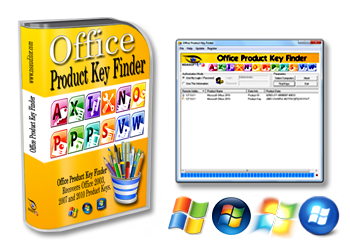
Office Product Key Finder has a user friendly interface and you should just press “Find Keys�? button to retrieve license keys from your local machine. If you want to recover license keys from remote computers, choose appropriate “Authorization Mode�? and enter your Admin user name and password, then press “Select Computer�? button and in “Host Range Selection Dialog�? select appropriate mode: 1. “Local Computer�? mode for recovering product keys from your local machine 2.“IP Range�? mode for retrieving serial numbers from network computers (enter start/end IP Addresses) 3. “IP Address List�? mode for retrieving license keys from appropriate network computers ( provide path to .txt file that contains IP Address or Computer Name in every line). After press “Ok�? button to close “Host Range Selection Dialog�? and press “Find Keys�? button to start product key scan and recovery process. |
||||||||||||||||||||
|
||||||||||||||||||||
| Requirements for “Office Product Key Finder�? remote audit: | ||||||||||||||||||||
|
||||||||||||||||||||
1. "Client for Microsoft Networks" should be enabled on your and on remote computer 2. "Remote Registry" service should be enabled on remote computer 3. You should have remote computer registry access rights 4. You should have administrative privileges on the remote computer and C$ administrative share should be enabled for retrieving some products Registration Information. 5. Firewall on remote computer should be turned off or configured appropriately to allow your access. If you have firewall program running on remote computer, turn off it or use firewall program manuals to configure it appropriately to get remote access from your computer. If you use the Windows firewall,you should go to 'Allow Programs'/Exceptions section and verify that the 'File And Printer Sharing' option is checked.' [HKEY_LOCAL_MACHINE\SYSTEM\CurrentControlSet\Control\Lsa] 7.Turn off the Remote User Account Control in Windows Vista and Windows 7. UAC ( User Account Control ) component of Windows 7/Vista doesn't allow to get administrator access on a remote machine. In order to turn off this restriction, you should set the following Registry value: [HKEY_LOCAL_MACHINE\SOFTWARE\Microsoft\Windows\CurrentVersion\Policies\System] More information about User Account Control and remote restrictions available >> Here |
||||||||||||||||||||
|
||||||||||||||||||||
| How To Run Office Product Key Finder From Command Line? | ||||||||||||||||||||
|
||||||||||||||||||||
|
||||||||||||||||||||
| How To Save and Backup Retrieved Product Keys? | ||||||||||||||||||||
|
||||||||||||||||||||
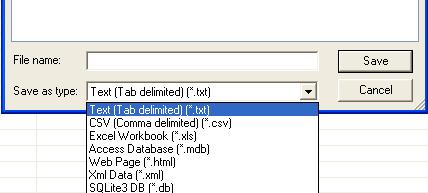
You can backup software products registration keys to Registry File (.reg), save as Tab Delimited Txt File (.txt), CSV Comma Delimited (.csv), Excel Workbook (.xls), Access Database (.mdb), SQLLite3 Database, Web Page (.html) or XML Data (.xml) file, print key list or copy all to clipboard. Just right click to key list and choose appropriate option. Please note: the trial version doesn’t allow backup or print product key list. |
||||||||||||||||||||
| After selecting “Save To File�? menu item you can choose different formats to save your data, this option available only in registered versions. | ||||||||||||||||||||
 |
||||||||||||||||||||
| Our Clients |  |
 |
 |
 |
 |
 |
 |
 |
| Home | Products | Ordering | Downloads | Company | Support | Partners |
|


