|
Settings
|
|
Section
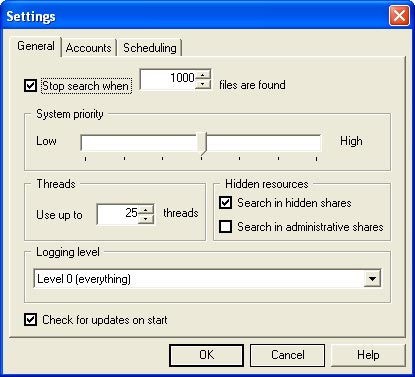
General
 |
-
Stop search when N files are found - Search
will be stopped when number of found files will reach specified value N.
-
System priority - Specify the NetworkSleuth
threads priority.
-
Threads - Set the maximal number of threads
that NetworkSleuth can use in search process.
-
Search in hidden shares - If checked then
NetworkSleuth will perform search in remote computers hidden shares also.
-
Search in administrative shares - If checked
then NetworkSleuth will perform search in remote computers administrative
shares also. (Note: you should have administrative
access to remote computer)
-
Logging level - Specify logs verbosity level.
-
Check for updates on start - If checked then
NetworkSleuth will check for new version on start.
|
|
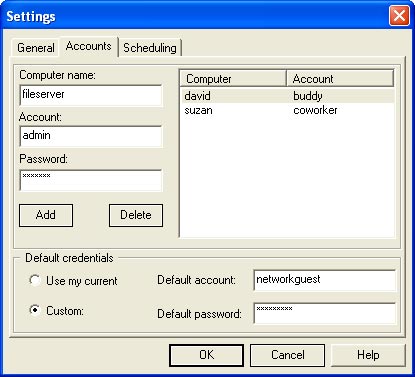
Section Accounts

|
-
Computer name - Remote computer's name for
which you are adding account.
-
Account - The
username which will be used to login to the remote computer.
-
Password - The password which will be used to
login to the remote computer.
If no special
account specified for remote computer
then default credentials will be
used to login.
-
Use my current - Default credentials will be
your current username/password which you used to login to your computer
-
Custom - You can
specify another credentials as default which can differ with you current
credentials.
-
Default account
- Specify username for default credentials.
-
Default password - Specify password for
default credentials.
|

|
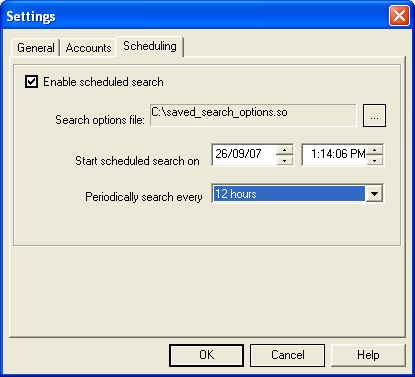
Section Scheduling

|
-
Search options file - Specify search options
by choosing previously saved search options file.
-
Start sheduled search on
- Set the date and time when scheduled search should start.
-
Periodically search every
- Specify time interval after which scheduled search
should be repeated.
|
|
[controls]
[settings] [usage
examples]
|
|
 |